
Where do you keep the title, description and keywords for every store?
- Your title and subtitle, counted against KDP's and IngramSpark's limits.
- Your description written once, its length checked against KDP, IngramSpark and Apple Books, and any other store's limit you type in.
- Your seven keyword boxes, with repeats and words already in your title flagged.
- Your prices, ISBNs and links for each store, one row to a book and store.
- A log of what you changed, when and why.
One payment. If it isn't useful, email me within 7 days of buying and I'll refund you in full.

What the sheets look like
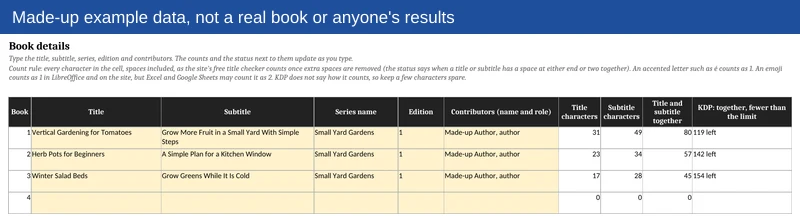
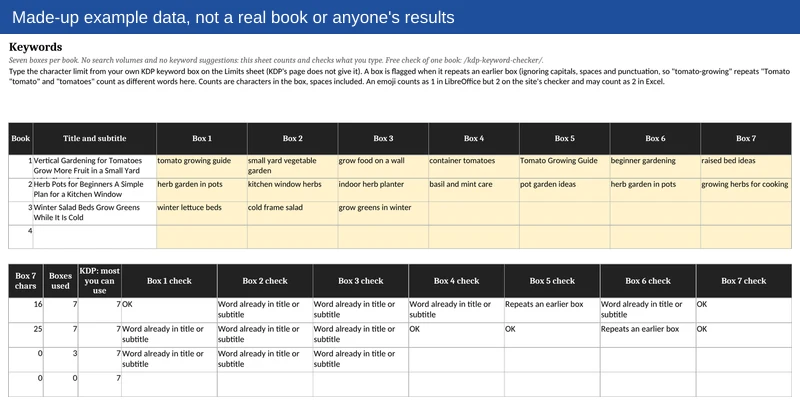
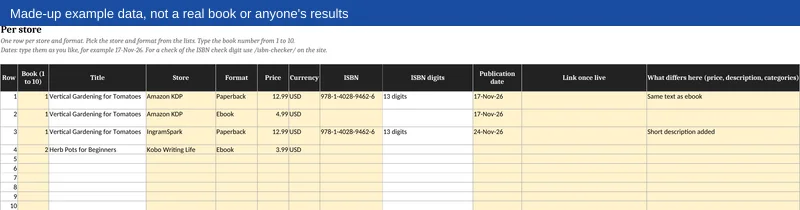
These show made-up books. The pictures say so on their face.
What is inside
- Start here: what each sheet is for
- Limits: the figure each store's help page gives, with its link and the date I checked it
- Book details: title, subtitle and more, one row per book, for 10 books
- Description, with the length counted
- Keywords, with a parking list for 30 more
- Categories
- Per store: price, ISBN and link, 60 rows
- Author bio, in three lengths for each of 5 authors
- Reviews and A+ content, 60 rows
- Change log, 100 rows
- Example: a made-up book, filled in
- A 4-page PDF guide
The yellow cells are yours to fill in. The rest is locked in Excel and LibreOffice, with no password. Google Sheets and Apple Numbers do not keep the lock, so keep an unchanged copy of the file before you type there. There are no macros and nothing links outside the file.
Where a store's help page gives no number for a field, the cell is left blank for you to fill in. Nothing in the file is filled from memory.
Who it is for
Authors with one or more books on KDP and other stores who want the title, description, keywords and prices in one place instead of in old notes and emails.
Who it is not for
It gives no keyword ideas, search volumes or category data, and it writes nothing for you. If you only want a one-off check, use the free title checker or keyword checker. If you want a second pair of eyes on your whole book plan, look at my 1-on-1 coaching.
What you need to open it
A spreadsheet program. The file is an Excel file (.xlsx). I opened and checked it in LibreOffice, Microsoft Excel 16 (read-only), Google Sheets and Apple Numbers 15.1.1 with the same text. The counts are equal in all of them, except that an emoji counts 2 in Excel and Google Sheets and 1 in Numbers and LibreOffice. The locks work in Excel and LibreOffice, not in Google Sheets or Numbers. The Keywords sheet's checks (a box that repeats another, a word already in the title) were checked in Excel, Google Sheets and LibreOffice. In Apple Numbers, compare any flag that looks wrong with the Example sheet, or use Excel or Google Sheets for that sheet; the guide says the same.
Questions
What do I get?
An Excel file and a 4-page PDF guide. You get the download link straight after you pay.
What if it isn't useful?
Email me within 7 days of buying and I'll refund you in full. The 7 days count from the date you bought it.
Are the store limits current?
They were checked on 17-Nov-26. Stores change their rules from time to time, so each limit sits in a yellow cell with a link to the store's own page. If a number has changed, you type the new one in.