


This post contains affiliate links. If you buy through one, Urgesta AS may earn a commission at no extra cost to you. Read the affiliate disclosure.
Get the free checklist: the 12 steps I follow for every book I publish.
You can self-publish with no money by using a free tool for each step. Check the writing with free spelling and grammar tools, format with Kindle Create, make the cover with KDP Cover Creator or Canva and a free photo, and copy the style of the best sellers in your niche for the description. The goal is to get the first book out. You can buy better tools once it earns. The rest of this post follows one author, Saeed, through each step.
Why do authors with no money feel stuck?
Saeed had finished writing his first book. He was 20, living in Egypt, and had no money. He had watched some of my YouTube videos and began to see there might be options, but the list looked overwhelming: a cover, editing, formatting, a description, an account to set up. Without money to pay anyone, he thought the book would never reach the market.
On top of that, he met plenty of gurus. Some say self-publishing is easy if you pay them a big fee. Hybrid companies ask for even more and promise you will be happy with the work. That was demotivating. English is also not his first language, which made him doubt the book could compete.
I push the opposite approach: learn the skills yourself, then hire out as the money starts to come in. That way you focus on the parts you enjoy. If you want the full process first, I cover it in how to self-publish your book step by step.
He noticed I do free sessions, where many others charge for the same call. He told me up front he could not pay anything. I do sessions regularly with people who will never be able to pay me back. I learn from every one, the same problems repeat, and getting more authors’ books onto the market is worth the time, especially in regions where money does not come easily.
How do you edit a book for free?
Write the book yourself. If you pay someone to write it, that costs money. Then edit in four passes.
- Run it through Grammarly.
- Run Word’s spelling and grammar check, with the proofing language set to English.
- Run LibreOffice’s spelling and grammar check.
- Ask friends who know English, or your audience if you have one, to read it as beta readers.
Why use so many? Each tool finds things the others miss. Amazon also runs its own quality checks on your book, and Saeed’s book got through without spelling errors because of these passes.
How do you format a book for free?
Put the book in Word, then use Amazon’s free Kindle Create. KDP says Kindle Create can take a DOC or DOCX file and build an ebook, or a paperback in any trim size. It has limits: KDP lists no editing of tables, lists or footnotes in the tool, and recommends its KPF file for publishing rather than EPUB. You can also upload a Word file directly. It may not pass on the first try, and you may go back and forth with KDP. That is free, and it is not a problem with your account.
Once the first book earns, I recommend Atticus.
How do you make a book cover for free?
Use KDP’s own Cover Creator, which is free and sits inside the book setup. KDP notes that covers made with its stock images can’t be downloaded for use outside KDP. The other free route is Canva, which has templates sized for Kindle covers, and it is the easiest program for this. It still takes a little time to learn.
If you want a different photo, go to Pexels or Pixabay. Pexels says its photos are free to use, you can edit them, and you do not need to give attribution. It does not allow selling unaltered copies, such as posters, or implying that a person or brand endorses you. I did a session recently with an author who had been told you can’t edit or sell books with these photos. We read the site’s licence together, and they could.
KDP also asks you to tell them if text, images or translations are AI-generated when you publish. AI-assisted work, where you made it and a tool only helped edit it, does not need disclosing.
How do you write the description?
Look at the best sellers in your niche on Amazon. People vote with their wallets, so make the page flow and look similar to what they are buying, in your own words.
What happened to Saeed?
He finished the cover in Canva, uploaded the book and had it on Amazon. There was a little back and forth with KDP, and the book did pass. He saw some sales, fewer than some of my clients, which is what you expect from a free route. Marketing can also be free using content marketing, though ads cost money, so he waited on those. He also left me a testimonial.
Doing it for free will not give you the best result. The goal is the first book. Saeed also got my free 12-step checklist and could see the steps in order.
If you are weighing whether to start at all, how to tell if self-publishing is right for you has the two questions I ask.
If you are in the same situation, get my free 12-step checklist and go through the steps in order. Before you start, read the 3 habits I gave up to win at self-publishing, and see should you self-publish a book? for the decision itself.
Listen to this episode on Spotify
Frequently asked questions
Can I self-publish a book for free?
Yes. Use a free tool for each step: free spelling and grammar checks for editing, Kindle Create for formatting, and KDP Cover Creator or Canva for the cover. The goal is to get the first book out, then buy better tools once it earns.
How do I edit my book for free?
Write the book yourself, then edit in four passes: Grammarly, Word's spelling and grammar check, LibreOffice's check, and friends or your audience as beta readers. Each tool finds things the others miss.
Can I make a book cover for free?
Yes. KDP's Cover Creator is free and sits inside the book setup, and Canva has templates sized for Kindle covers. For a different photo, Pexels and Pixabay offer free photos. Pexels says you do not need to give attribution.
What are the limits of Kindle Create?
It takes a DOC or DOCX file and builds an ebook or a paperback in any trim size. KDP lists no editing of tables, lists or footnotes in the tool.
Does AI-generated content need to be disclosed to KDP?
KDP asks you to tell them if text, images or translations are AI-generated. AI-assisted work, where you made it and a tool only helped edit it, does not need disclosing.
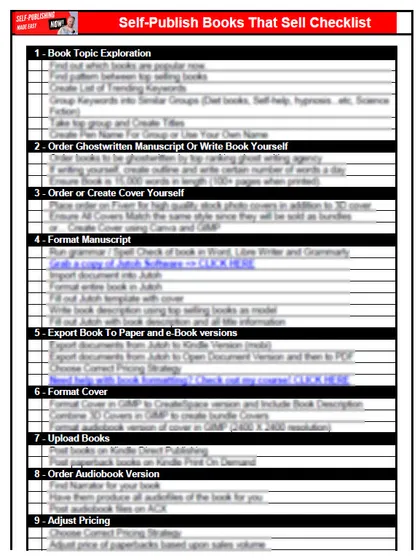
Start with the free checklist
The checklist is the 12 steps I follow for every book I publish, from choosing a topic that already sells to setting up the book's marketing. It is free, and you get it straight away.
You get the free checklist and Chris's emails. Unsubscribe any time. Privacy policy
Not sure yet? Book a free 25-minute call
Newest posts
Popular guides
- Lulu Self-Publishing Review 2026: Pros, Cons and Costs
- IngramSpark Review 2026: Free Setup, New Fees and Is It Worth It?
- Is Pegasus a Vanity Publisher? (2026 Update)
- Can You Sell Self Published Books On Etsy?
- How To Edit Your Books For Free With Grammarly
- Self Publishing Lulu VS Blurb?
- 5 Best Self Publishing Courses for Beginners (2026)
- How Long Should A Self-Published Book Be
- What Are The Minimum Amount Of Words For Paperback Books?
- Comparing Ingramspark, Lulu, and KDP Print
- How Many Books Do Self Published Authors Sell?
- Self-Publish For Under $199!
Tags
- Posts tagged amazon
- Posts tagged book
- Posts tagged costs
- Posts tagged discovery session
- Posts tagged Editing
- Posts tagged goal
- Posts tagged Grammar Check
- Posts tagged Jutoh
- Posts tagged market
- Posts tagged marketing
- Posts tagged money
- Posts tagged sales
- Posts tagged self-publishing
- Posts tagged tools
- Posts tagged writing